aiXplain AgenticOS
Platform for building, deploying, and governing mission-critical AI agents at enterprise scale across managed and private infrastructure.
What is aiXplain AgenticOS?
aiXplain AgenticOS is a full-stack platform for building and managing autonomous AI agents at enterprise scale, with code and no-code tooling on the same governed runtime. It is built for speed and trust, without locking teams into a single model, surface, or deployment boundary.
- Portable: run across cloud, on-prem, and air-gapped environments with no infrastructure or model vendor lock-in.
- Governance: maintain control, visibility, and auditability over builders and agents, including who can access what and what actions are allowed.
- Future-proof: let agents evolve from production signals while the platform absorbs model and vendor changes under governance constraints.
On-prem deployment: AgenticOS OnPrem supports fully air-gapped deployments with zero outbound connectivity. See the Private deployment guide.
Architecture
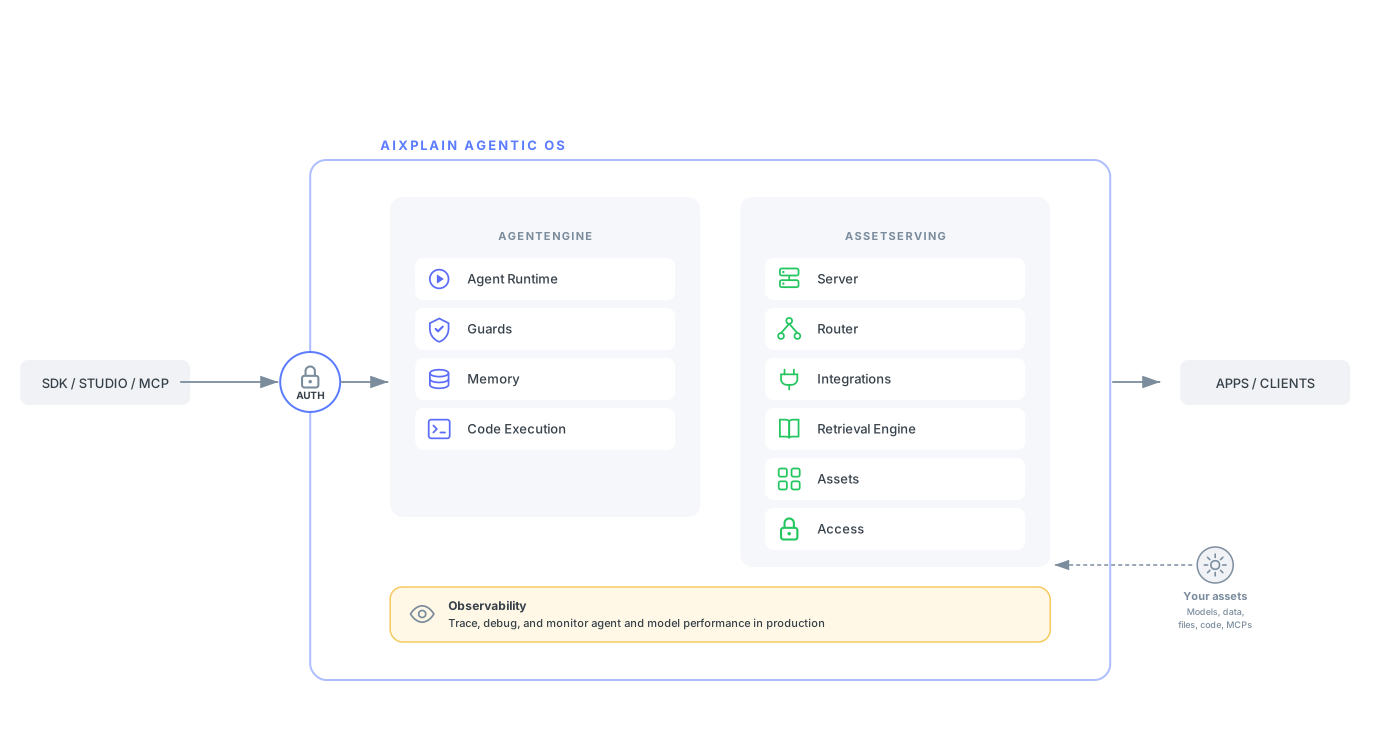
Core components
| Component | Description |
|---|---|
| AgentEngine | The execution and orchestration layer of AgenticOS. Handles agent execution, governance, memory, and code execution. |
| AssetServing | The serving and access layer of AgenticOS. Handles model and tool execution, routing, integrations, retrieval, asset catalog access, and access control. |
| Observability | Unified view to trace, debug, and monitor agent and model performance in production. |
| Interfaces | User and programmatic surfaces for building, managing, and accessing agents across AgenticOS. |
AgentEngine
The AgentEngine is the core orchestration and execution layer. It manages the full agent lifecycle from configuration through execution, coordinating planning, memory, and tool calls on every run.
AMS (Agent Management System) is the runtime governance and optimization system within AgenticOS. It includes micro-agents that govern execution at runtime and meta-agents that optimize agents across their lifecycle.
Services included:
| Service | Description |
|---|---|
| Agent Runtime | Executes single agents and team agents asynchronously at scale. Provides serverless deployment, session isolation, multi-modal support (text and image), multi-agent coordination, and async execution with built-in resilience through step retries, replanning, and execution timeouts. Micro-agents, like Inspector and Bodyguard, operate inside the execution loop to handle planning, routing, validation, and response. Meta-agents, like Evolver, operate across the lifecycle to design, evaluate, deploy, and continuously improve agents. Tool invocation is governed by allowed actions scoped at the agent level, ensuring agents only call permitted operations. |
| Guards | Runtime enforcement service housing Inspector and Bodyguard. Intercepts every tool call before execution to determine which tools agents can access, what actions they can perform, and under what conditions. Inspector validates inputs and outputs at checkpoints inside the execution loop, enforcing PII redaction, content moderation, jailbreak detection, hallucination detection, custom compliance policies, and human approval checkpoints. Bodyguard enforces access controls and permissions at the asset boundary. Together they operate alongside HITL checkpoints and allow agents to scale without scaling manual review work. |
| Memory | A way to build context-aware agents with complete control over what the agent remembers and learns. Maintains context within and across sessions. Short-term memory persists across turns in a single conversation. Long-term memory persists across sessions. Shared memory is accessible across multiple agents. Retained as opt-in for the user and never used by aiXplain for model training. |
| Code Execution | An isolated sandbox environment for agents to execute code, enhancing accuracy and expanding their ability to solve complex end-to-end tasks. |
AssetServing
AssetServing is the serving and access layer of AgenticOS. It handles model and tool execution, routing, integrations, retrieval, asset catalog access, and access control across assets running inside AgenticOS or in the wider enterprise environment, while keeping interactions within your infrastructure perimeter. It creates a standardized interface between assets and agents to support swappability and modularity.
Services included:
| Service | Description |
|---|---|
| Server | Executes model and tool invocations. Routes requests to the correct supplier, handles async polling, and surfaces an OpenAI-compatible interface. Supports hundreds of LLMs and tools across various vendors. |
| Router | Directs model and tool requests to the optimal endpoint at runtime. Handles supplier fallbacks when a model is unavailable, model-level retries, supplier timeouts, and logic-based routing such as switching to the lowest-cost model at runtime. |
| Integrations | Connects agents to services and data sources through OAuth and authenticated connections. Manages provider action catalogs, trigger subscriptions, async tool execution, and MCP exposure. Converts APIs and MCP-compatible tools into agent-callable functions, and connects to pre-existing MCP servers. Connecting an integration generates tools, including knowledge bases as vector-indexed retrieval tools, that can be attached to agents. |
| Retrieval Engine | Managed set of services for data ingestion, storage, and retrieval. Supports Qdrant vector databases for semantic search, knowledge graphs for relationship-aware reasoning across connected sources, and SQL databases for structured data access. Also serves as the storage substrate for long-term and shared Memory. |
| Assets | Catalog of models, tools, integrations, and pre-built agents available on AgenticOS. Standardized APIs and specs allow for easier comparison, integration, and swappability across vendors. Accessible from Studio, SDK, MCP, and REST API and consumable across the runtime. |
| Access | Enforces authentication, RBAC, API key and action scoping, rate limiting, and enterprise SSO across platform services. |
Observability
Observability provides a unified view to trace, debug, and monitor agent and model performance in production. It offers detailed visualizations of each step in the agent workflow so teams can inspect execution paths, audit intermediate outputs, and debug performance bottlenecks and failures.
Capabilities:
- Visual execution traces across agent and model runs
- Telemetry for latency, usage, cost, and error analysis
- Monitoring data retained across managed and private deployments
- Runtime visibility surfaced in Studio and available to lifecycle optimization systems such as Evolver
Interfaces
| Surface | Description |
|---|---|
| aiXplain SDK | Programmatic interface for building and managing agents through Python. |
| aiXplain Studio | The visual interface for building, validating, deploying, and observing agents. Serves business users and developers. Includes an asset catalog for discovering and connecting models, tools, integrations, and pre-built agents. |
| Bel Esprit | Conversational coding agent for building and deploying agents end-to-end, abstracting complexity and optimizing for speed. |
| aiXplain MCP | MCP surface for exposing AgenticOS tools and agents to MCP-compatible clients. |
AgenticOS OnPrem deployment
aiXplain AgenticOS can be deployed entirely within your own infrastructure, including fully air-gapped environments with zero outbound connectivity. AgenticOS OnPrem is supported, with all data, models, logs, and telemetry remaining within your network boundary.
For architecture details, scaling, air-gapped installation, infrastructure prerequisites, and the Compute Management Service, see the Private Deployment guide.
Resilience
aiXplain AgenticOS is designed so that no single model, endpoint, or infrastructure dependency becomes a point of failure for your agents.
| Capability | Description |
|---|---|
| Model portability | Agent logic, tools, subagents, governance policies, and memory remain intact when models change. |
| Fallback models | Up to three fallback LLMs can be configured in priority order for automatic failover. |
| Automatic optimization | Prompt formats, tool invocation, schemas, token budgets, and sampling settings adapt to the target model. |
| Execution resilience | Stateless execution, retries, timeouts, failover, and human approval checkpoints reduce runtime failure risk. |
Security and data handling
See aiXplain Security.
- We do not train on your data.
- No data retained by default. Memory is opt-in.
- SOC 2 Type II certified.
Security architecture summary
| Category | Capability |
|---|---|
| Data handling | Inference runs entirely in memory by default. The only persisted data is opt-in, such as embeddings for RAG and agent memory when explicitly configured. |
| Data sovereignty | Full control in AgenticOS OnPrem; no data leaves your network |
| Encryption | TLS 1.2+ in transit across all deployments; AES-256 at rest on Cloud |
| Access control (Bodyguard) | RBAC, API keys scoped to specific LLM models with least-privilege enforcement, optional enterprise SSO, and asset/action-level access restrictions enforced at runtime |
| Auditability | All API, SDK, and UI actions fully logged and traceable by asset ID, deployment version, and usage logs |
| Policy enforcement (Inspector) | Runtime validation on every execution, including PII redaction, content moderation, jailbreak detection, hallucination detection, citation checks, custom compliance policies, and human approval checkpoints |
| Isolation | Session-scoped, stateless execution by default; sandboxed tool execution |
| Staff access | AgenticOS OnPrem: zero aiXplain staff access. Cloud: restricted to designated engineers under audit logs |
| Logging | INFO level by default — no customer inputs or outputs captured. Debug logging requires explicit customer authorization |
| Vendor lock-in | Vendor-agnostic: connect to any model, tool, or data source; deploy on any mode with no dependency on aiXplain infrastructure. Bring Your Own Key is available for any model provider. |
Pricing and credits
- 1 credit = $1 USD
- Builder plan — pay-as-you-go via Stripe (Google Pay or credit card)
- Team plan — subscription for high-volume usage*
- Enterprise — custom pricing with SLAs and dedicated support
Direct model usage is billed at vendor rates. Deployed agents are billed at vendor rates plus a 20% service fee.
Where to get help
- Documentation — full platform docs, quick start, tutorials, and API reference
- Discord community — connect with developers and the aiXplain team
- Enterprise contact — custom deployments, dedicated support, and SLAs
Frequently asked questions
Can both technical and non-technical users work on the same deployment?
Yes. The aiXplain SDK serves data science and engineering teams, while aiXplain Studio provides a no-code interface for business users. Both operate against the same runtime and governance layer, so all agents, policies, and assets are shared across user types.
What happens to my data during inference?
By default, inference runs entirely in memory and nothing is written to disk. Prompts and responses are never used for model training. The only data persisted is opt-in: embeddings when RAG is enabled, and agent session memory when explicitly configured.
Can memory be disabled?
Yes. Both short-term and long-term memory can be toggled off per agent or per session, giving you control over privacy exposure and storage costs.
How is governance enforced?
Governance is enforced at runtime on every agent execution through Guards. Inspector validates inputs and outputs for PII, jailbreaks, hallucinations, custom compliance rules, and human approval checkpoints. Bodyguard enforces asset and action-level access restrictions scoped to API key and user ID. Humans handle approval, escalation, and exceptions. Inspector and Bodyguard handle the volume, enabling governance to scale across concurrent agent executions.
How long are execution traces retained?
Execution traces are retained for 14 days by default. Unlimited retention is available for Enterprise deployments.
Can shared memory be controlled?
Yes. Shared memory stores are accessed selectively, and agents must explicitly opt in. Memories can be created automatically or inserted explicitly by a developer or agent. Edit and clear operations are coming soon.