Agents & Team Agents
Agents are autonomous AI systems that handle complex tasks through planning, reflection, and orchestration. Unlike static workflows, agents make dynamic decisions about which tools to use, when to use them, and how to combine results—all based on natural language instructions.
What Makes Agents Autonomous
Agents are instruction-driven reasoning components powered by Large Language Models (LLMs) that operate through a continuous plan → act → observe → repeat cycle. They autonomously handle action, orchestrate tool use, and access external data, services, and code generation/execution capabilities.
Core Capabilities:
- Dynamic Planning – Break down complex requests into executable steps and adapt in real-time
- Reflection – Evaluate outputs, adjust approach iteratively, and self-correct
- Tool Orchestration – Dynamically select and invoke tools based on context and need
- Collaboration – Coordinate with other agents to solve multi-faceted problems
- Code Generation & Execution – Generate and run code dynamically to accomplish tasks
- Memory – Maintain context across interactions through durable session management
Agent vs. Team Agent
Agent
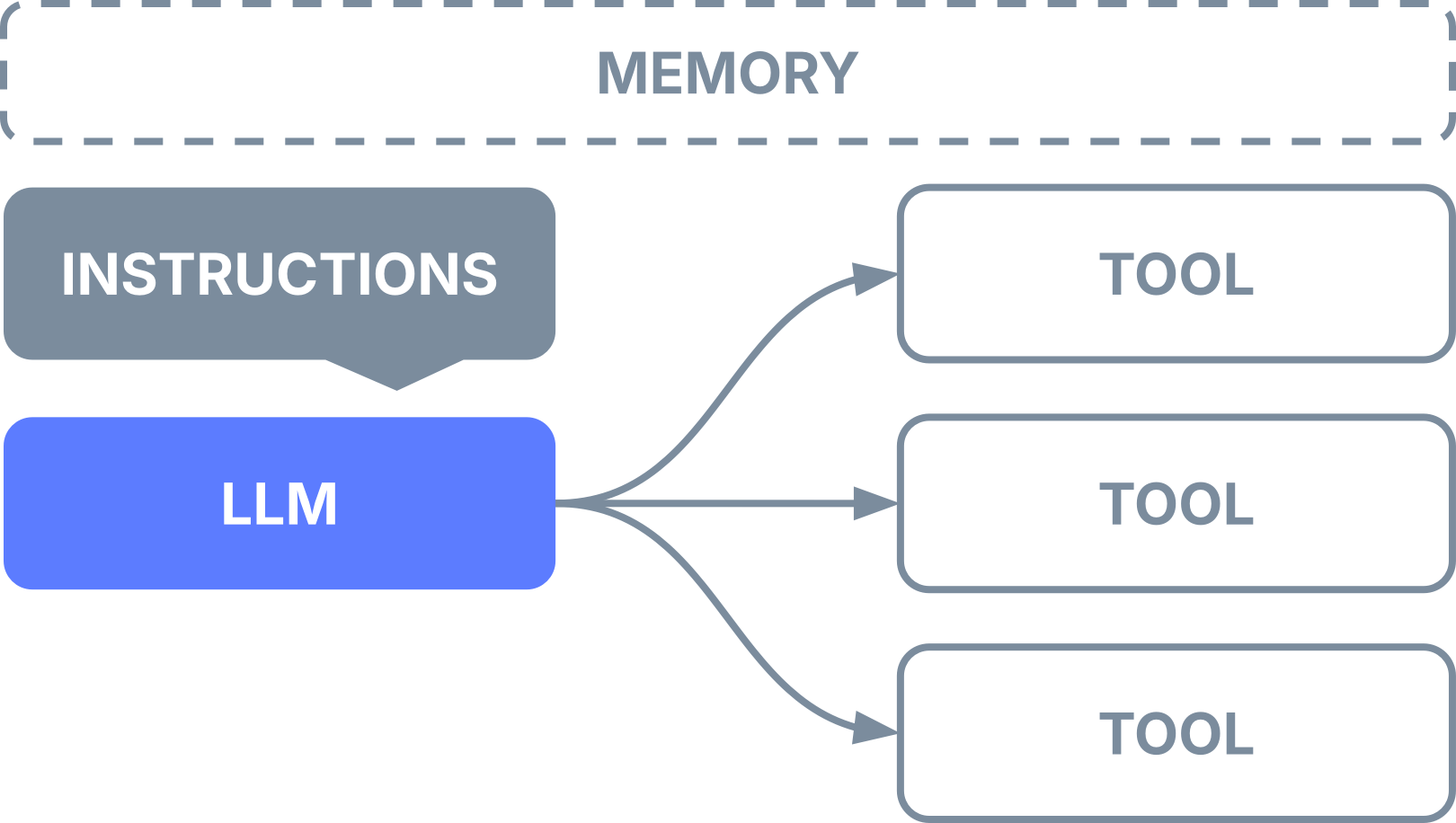
Single-agent system for autonomous, focused tasks using natural language reasoning and tool use.
Best for:
- Q&A with retrieval (Agentic RAG)
- Task automation with tools
- Conversational interfaces
- Multi-turn interactions with memory
Example use cases: Customer support chatbot, document Q&A, data extraction, translation services
Team Agent
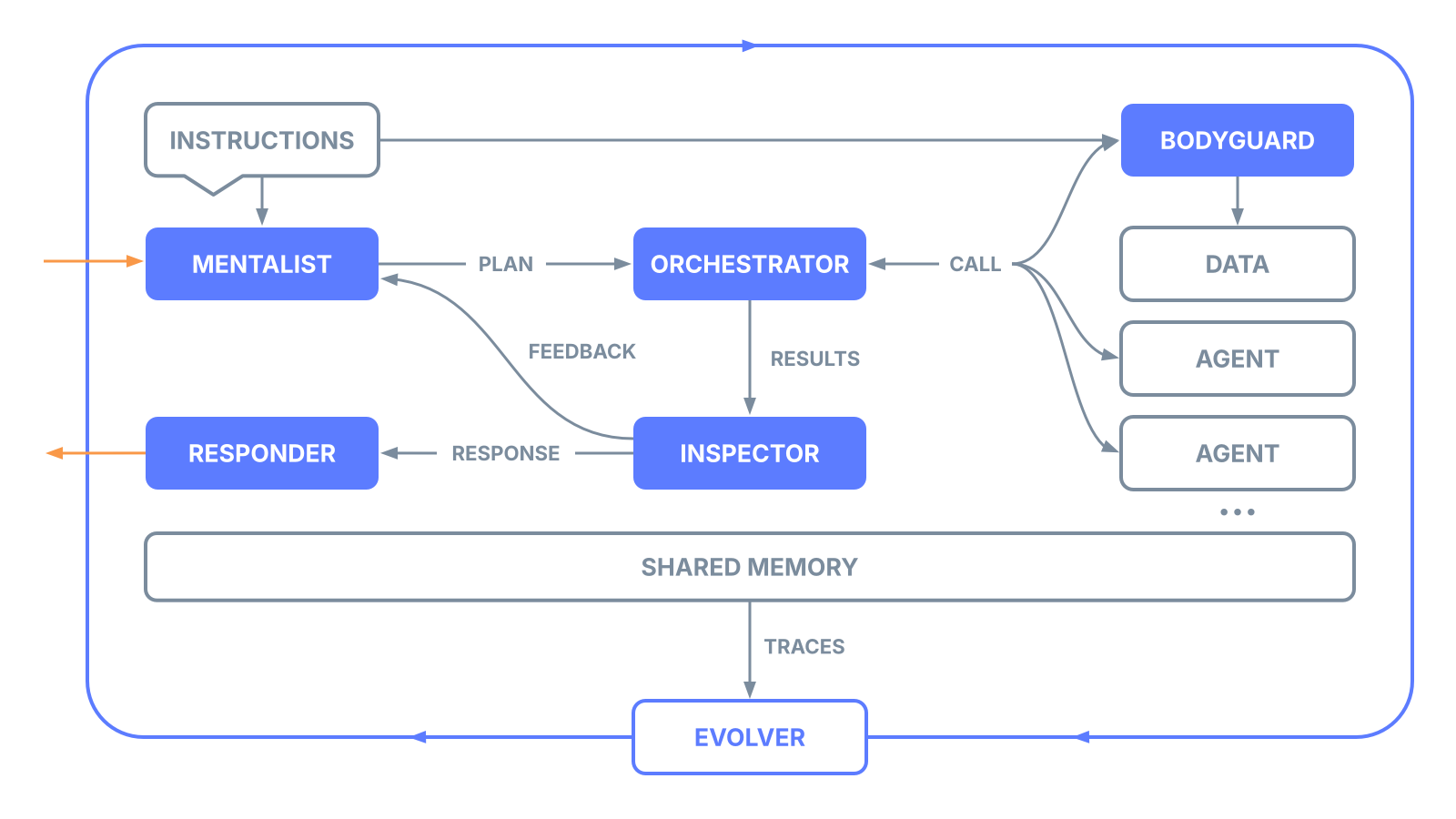
Multi-agent system that orchestrates multiple specialized agents with autonomous coordination and quality control. Team agents enable sophisticated multi-agent AI applications that require orchestration and collaboration.
Best for:
- Complex workflows requiring multiple specialized skills
- Tasks needing quality validation and enforcement
- Cross-functional automation
- Research and analysis pipelines requiring diverse expertise
Example use cases: Lead generation with qualification, research report generation, multi-step content creation, automated due diligence
Key differentiators:
- Multi-agent orchestration – Coordinate multiple AI agents in complex workflows
- Built-in coordination layer – Micro-agents handle planning, validation, and orchestration automatically
- Quality enforcement – Runtime validation checkpoints ensure output quality and policy compliance
Micro-Agents & Meta-Agents
aiXplain's agent architecture includes built-in micro-agents and meta-agents—a unique approach that separates platform concerns (governance, optimization, coordination) from business logic. This enables agents to focus on domain-specific tasks while infrastructure handles cross-cutting capabilities consistently and transparently.
Micro-Agents
Specialized, lightweight agents that provide platform-level capabilities transparently. They operate as infrastructure components that handle cross-cutting concerns without requiring manual implementation.
Available in both Single Agents and Team Agents:
- Response Generator – Formats final outputs based on specified output format (text, markdown, JSON)
Additional for Team Agents:
- Planner – Decomposes goals into structured task plans with dependencies
- Orchestrator – Routes tasks to appropriate agents and manages execution order
- Inspector – Validates outputs for safety, compliance, and quality (learn more)
Micro-agents ensure governance through built-in coordination, providing policy enforcement, quality validation, and compliance at runtime.
Meta-Agents
Self-improving agent systems that monitor, analyze, and optimize other agents over time. They operate at a higher abstraction level, treating agents as subjects for continuous improvement.
Evolver – Enables continuous learning and autonomous performance improvement across multiple runs (learn more)
Meta-agents enable adaptability through continuous learning, reducing maintenance burden and compounding performance improvements over time.
Agent States
Draft – Initial state when created; temporary endpoint with 24-hour expiration. Used for development, testing, and iteration.
Onboarded (Deployed) – Permanent state after deployment; persistent endpoint that doesn't expire. Available via API for production use with versioning support.
Deleted – Removed from system and no longer accessible.
Building Blocks
1. Instructions
Natural language prompts that define agent behavior, tone, role, boundaries, and success criteria. Instructions guide how agents reason, respond, and decide when to invoke tools.
2. LLM (Large Language Model)
The reasoning engine that interprets instructions, plans actions, and selects tools. aiXplain supports 170+ swappable LLMs through a unified interface—allowing model flexibility without code changes.
3. Tools
Capabilities that extend agent functionality beyond language generation:
- AI Models – 700+ models for translation, speech recognition, OCR, sentiment analysis
- Utilities – Search engines, web scrapers, APIs, webhooks
- Pipelines – Deterministic workflows that can be used as tools
- MCPs – Model Context Protocol integrations for external services
- Custom Functions – Python code for specialized logic
- Other Agents – Agents can invoke other agents as tools
- Data Sources – Vector databases, knowledge graphs, SQL/CSV connectors
Tools are dynamically generated and selected by the agent based on task requirements.
4. Memory
Two types of memory management:
- Session-based – Pass a
session_idto automatically store and retrieve context across turns (persists 15 days) - Manual history – Explicitly provide conversation history in OpenAI format
Memory enables durable session management to maintain state across agent interactions.
5. Output Format
Structured response formats:
- TEXT – Plain text responses
- MARKDOWN – Formatted markdown output
- JSON – Structured data output; requires template or schema definition; includes validation function for debugging
How Agents Work
Agent Architecture (Single Agent)
Execution Flow:
- Initialize – Load configuration, process instructions, validate input
- Reasoning Loop (Plan → Act → Observe → Repeat):
- Plan: LLM analyzes the query and decides next action
- Act: Execute selected tools (if needed)
- Observe: Process tool results and update context
- Repeat: Continue until task completion or max iterations reached
- Output – Format and return final response
Built-in capabilities:
- Asynchronous support for handling concurrent operations efficiently
- Max iteration limits prevent infinite loops (default: 5-10)
- Full execution tracing for debugging and analysis
- Progress streaming with Off/Full/Compact modes for real-time updates
Team Agent Architecture (Multi-Agent)
Team agents add a sophisticated coordination layer through micro-agents (described above). The team agent has its own LLM (separate from member agents' LLMs) that handles orchestration logic.
Execution Flow:
- Query Manager – Analyzes task requirements and complexity
- Planner (Mentalist) – Breaks down goals into structured subtasks; determines which agents should handle each subtask (autonomous mode)
- Orchestrator – Routes tasks to appropriate agents based on capabilities or task dependencies
- Subagents Execute – Member agents work independently; may be invoked multiple times; results can trigger re-execution of earlier agents
- Response Generator – Synthesizes final outputs from multiple agent results
Note: When using structured workflows with predefined tasks and dependencies, Planner skips autonomous agent selection and follows the defined task graph.
Execution Modes:
- Dynamic Planning – Autonomous adaptation with real-time task decomposition
- Structured Workflows – Predefined tasks with explicit dependencies for deterministic execution
When to Use Each Type
| Scenario | Recommended Approach |
|---|---|
| Simple Q&A or single-tool tasks | Agent |
| Multi-turn conversations with memory | Agent |
| Agentic RAG (retrieval-augmented generation) | Agent |
| Complex multi-step workflows | Team Agent |
| Tasks requiring validation checkpoints | Team Agent |
| Cross-functional collaboration | Team Agent |
| Tasks needing continuous optimization | Team Agent with Evolver |
| Strict execution order requirements | Pipeline (use as tool) |
Building Agents
There are two ways to build agents:
No-Code via Studio – Configure agent instructions, output format, and settings, add tools from the marketplace, evaluate performance, and deploy through the visual interface.
Code-Based via SDK – Define and deploy agents programmatically using the Python SDK for advanced control and automation.
Integration
Deployment Options
- Multi-tenant cloud – Instant deployment on aiXplain infrastructure
- Dedicated infrastructure – Private cloud instances
- On-premises – Containerized deployment in your environment
- Hybrid – Agents run on-prem while accessing marketplace assets
- VPC – Private network deployment
API Access
- REST API – Standard HTTP endpoints
- OpenAI-compatible API – Drop-in replacement for OpenAI clients
- Python SDK – Native integration for Python applications
- cURL – Command-line access
Agent Lifecycle
- Create – Initialize as draft (expires in 24 hours)
- Test – Validate behavior and performance
- Deploy – Promote to permanent, reusable endpoint
- Update – Modify configuration as needed
- Save – Persist changes without redeployment
Monitoring & Observability
Execution Tracing:
- Full chain-of-thought reasoning steps
- Tool invocation details (input, output, rationale)
- Intermediate results and decision points
- Error capture and debugging context
- Micro-agent activations and validation checks
- Retry attempts and fallback logic
Performance Metrics:
- API call count – Total tool/service invocations
- Credit consumption – Cost breakdown per tool/agent
- Runtime duration – End-to-end execution time
- LLM latency – Time spent in LLM inference
- Tool latency – Time per tool execution
- Assets used – Tools, models, and agents invoked
- Quality metrics – Success/failure status, validation results
Progress Streaming:
- Off – No streaming
- Full – Complete real-time updates (tokens, status, errors)
- Compact – Summary updates only
Live Dashboards: Available in console.aixplain.com
- Real-time agent performance KPIs
- Usage patterns and trends
- Cost analysis
- Error rates and types
Guardrails & Governance
Inspector Agent
Runtime policy enforcement and validation system. Inspector operates as a micro-agent within team agents to ensure compliance and quality.
Capabilities:
- Content filtering and safety validation
- Policy enforcement (PII detection, compliance rules)
- Output quality checks
- Automated retries on validation failures
Configuration:
- Define validation rules and policies
- Set enforcement levels (block, warn, log)
- Configure retry behavior
- Specify target agents for inspection
Rate Limits & Quotas
Manage resource consumption and protect against abuse:
- Per-team limits
- Per-API-key limits
- Per-model usage caps
- Custom quota policies
Continuous Improvement
Evolver Agent
Meta-agent that monitors performance across runs and autonomously improves agent behavior over time.
Capabilities:
- Performance benchmarking
- Behavior analysis and pattern detection
- Automated optimization of instructions and tool selection
- A/B testing of configuration changes
Use cases:
- Gradual improvement of response quality
- Optimization of tool selection strategies
- Cost reduction through efficient model/tool usage
- Adaptation to changing user needs
Best Practices
For Single Agents:
- Keep instructions clear and specific
- Limit tools to essential capabilities (avoid overwhelming the agent)
- Use session memory for multi-turn conversations
- Set appropriate max_iterations for task complexity
For Team Agents:
- Design agents with distinct, specialized roles
- Use structured workflows for predictable multi-step processes
- Enable Inspector for quality-critical applications
- Monitor micro-agent decisions through execution traces
- Consider Evolver for long-running production deployments
General:
- Start with simple configurations and iterate
- Test thoroughly in draft mode before deploying
- Monitor execution traces to understand agent reasoning
- Use appropriate output formats for downstream systems
- Set reasonable token limits to control costs